OpenRouter vision models for gameplay clip detection
Choose OpenRouter vision models for Splice gameplay analysis, compare cost and quality tradeoffs, and understand what clip data is sent.
What is a vision model?
A vision model is an AI that can look at images — and, for some models, full video. When you analyze a clip, Splice does one of two things depending on the model you picked:
- For models that natively accept video (Gemini 3 Flash, Gemini 3.1 Flash Lite, Qwen 3.6 Plus, Nemotron 3 Nano Omni), Splice uploads the raw MP4 and lets the model sample it however it wants.
- For models that only accept images (the Gemma family), Splice extracts JPEG frames at the FPS you’ve configured and sends those.
Either way, the model gets your game-specific detection prompt and decides which timestamps count as a highlight.
Splice doesn’t build or host any AI itself. It routes analysis through OpenRouter — a marketplace where vision models from Google, Qwen, NVIDIA, and many other providers are available in one place. Splice’s built-in list covers Google’s Gemini and Gemma models, Qwen 3.6 Plus, and NVIDIA’s free Nemotron 3 Nano Omni; you can add any other OpenRouter vision model yourself from the Models page. Splice doesn’t take a cut of what you spend.
Switching models
Models are configured per game on the Models page (open it from the sidebar). Click a game card to expand it, then pick a tile in the model picker and hit Save — the next analysis run for that game uses the new model. You can also override the model for a single clip from the Re-analyze dialog on the Dashboard.
The picker shows each model’s provider, max sampling rate, max clip length, context window, input cost per million tokens, and a set of Quality / Speed / Cost balance meters. The dialog’s Sampling FPS slider also surfaces an estimated per-clip cost based on your current settings.
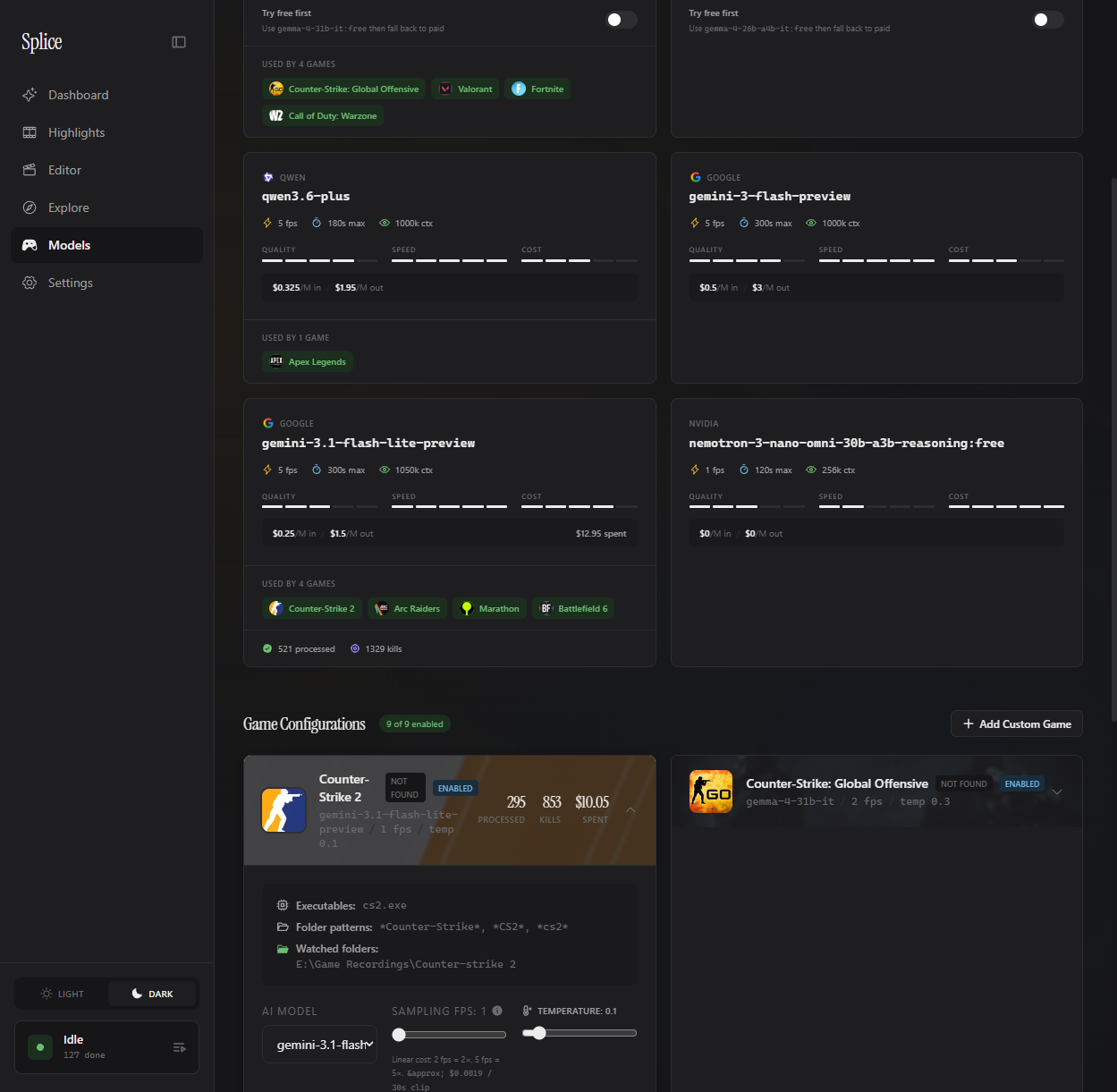
The cost tradeoff
Cheaper models are faster but they’ll miss some kills — especially in chaotic fights or unusual angles. More expensive models take longer and cost more per clip, but they catch more highlights and generate fewer false alarms.
Here’s the rough shape of it for the built-in models:
| Tier | Example | Input cost / M | Notes |
|---|---|---|---|
| Free | Nemotron 3 Nano Omni | $0.00 | Reasoning model; capped at 1 fps |
| Image-only | Gemma 4 31B / 26B A4B | $0.13 | Splice extracts frames; 1 fps cap |
| Budget (default) | Gemini 3.1 Flash Lite | $0.25 | Native video; 5 fps |
| Mid | Gemini 3 Flash | $0.50 | Native video; 5 fps; more accurate |
| Premium | Qwen 3.6 Plus | $0.325 in / $1.95 out | Native video; clips up to 3 min |
Exact costs depend on clip length and your sample-rate setting. Splice shows you the cost per job in the queue once it finishes, so you always know what you actually spent.
Your API key stays on your PC
Your OpenRouter key is stored locally at %APPDATA%\Splice\credentials.json (a deliberately separate folder from the rest of Splice’s data, so it survives an uninstall + reinstall). It’s never sent anywhere except directly to OpenRouter when an analysis job runs. Splice has no cloud server, no telemetry endpoint, and no usage data about your prompts or clips leaves your PC — the local Python daemon reads your key from disk only when it makes an OpenRouter request on your behalf. For the full data flow, see privacy and storage.